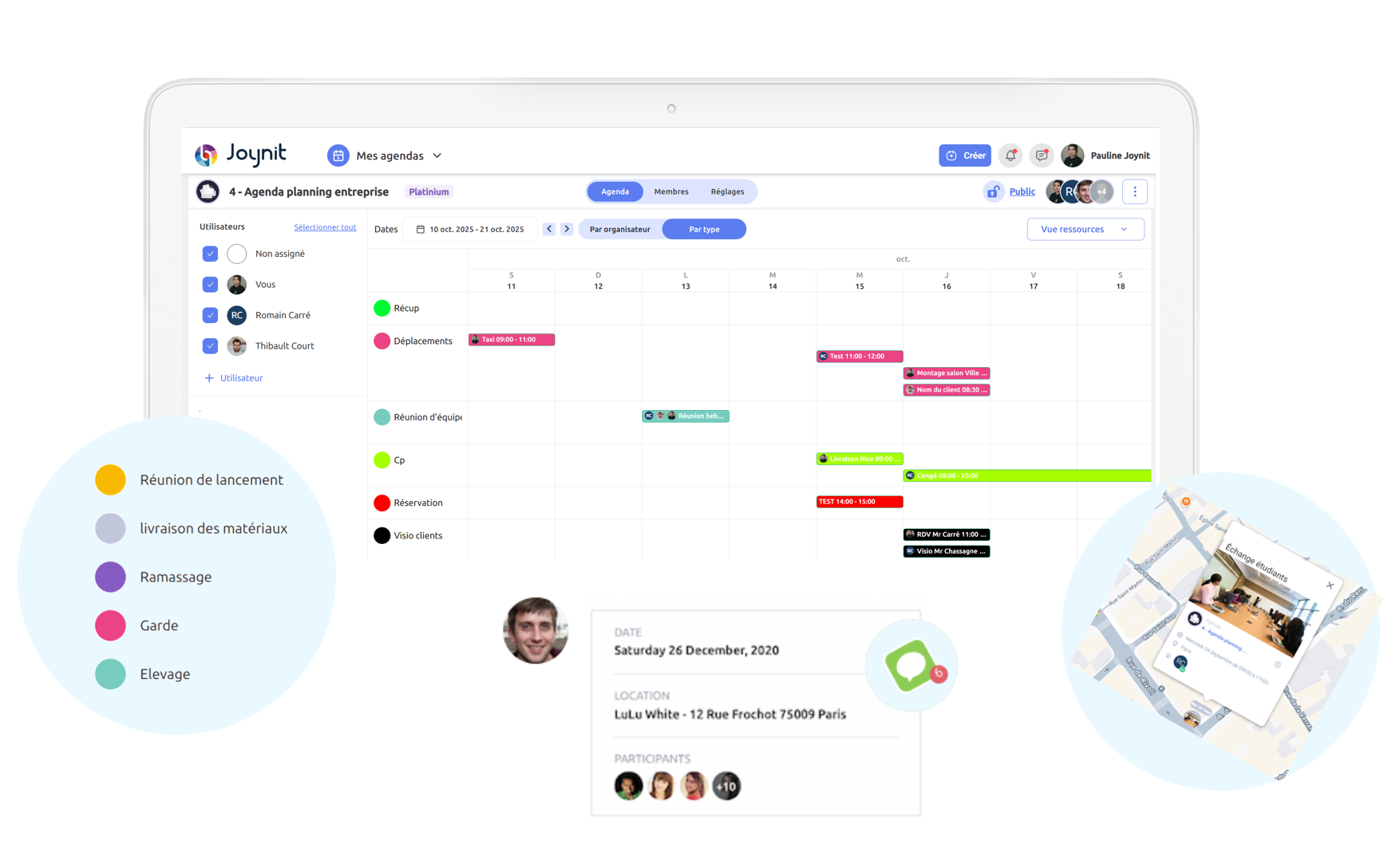







A shared calendar your whole team will actually use

See who’s in, who’s out and who’s on what, in one shared calendar your whole team can see on web and mobile. A team calendar, not an HR system.

$47/month flat for a team of 4. Not per user.

‍
⭐ 4.8/5 · 7,000+ organizations · No credit card required

Shared team calendar for small businesses: who’s in, who’s out and who’s on what, in Joynit

Keeping track of a small team usually looks like this:

❌The schedule lives in a spreadsheet, a group chat, and someone’s memory
❌No clear visibility on who is working, when, and where
❌Last-minute changes that don’t reach the whole team
‍
Joynit puts it all on one shared calendar, and everyone sees the same thing.

Reviews
4.8
(78)
A
Jean - Board Member, residents association
September 2024
We didn’t need to train anyone — people just got it
O
Amandine - Community Manager, non-profit organization
September 2024
A simple solution that actually fits how communities work
J
Justine - Event Organizer, local community group
May 2025
We stopped missing events once everything was in one shared calendar.
F
Florence Seigneuric
November 2024
Our small church wanted a simple tool to organize volunteers, groups, and events. Joynit made everything easier and helped our community stay connected.
S
Sylvie PP
November 2024
Application used since the end of 2024. Easy to use, it allows us to coordinate our teams well, at all levels.
A
Anais TERBECHE
November 2024
An amazing team and a super easy solution to manage our community events.
Real people, real support — and a tool that just works.
Y
Yann Girard
November 2024
People can see events and register without creating an account — that’s a big plus
X
Xima Monvieux
November 2024
Great application, very easy to use in addition to a team always ready to help you! I highly recommend.Our community is really satisfied with the services this application provides us with
Y
Yannick de Carvalho
November 2024
Easy to use, reliable, and affordable.
Perfect for organizing events and schedules in our community
P

Pole Ess
November 2024
Much simpler than juggling emails and spreadsheets.
J
Jacqueline
May 2025
Clean, clear, and easy to use for everyone.
Y
Yves Biton
February 2025
Excellent service and support, with courtesy. Continue like that. Thank you
P

Pole Ess
November 2024
We (Haute-Savoie Habitat) have been using JOYNIT for a few months to manage our concierge services. The experience to date is very satisfactory, the tool meets our needs. The customer relationship is great (thank you Pauline for the support) and the development team always listens to our needs and responds to them as much as possible.
Simple, fluid and effective... We recommend!
J
Jacqueline
May 2025
Very practical for managing and planning common areas.
Y
Yves Biton
February 2025
Excellent service and support, with courtesy. Continue like that. Thank you
A
Jean MAGUIN
September 2024
Very good planning for the management of our interventions and sites. You can immediately see who is assigned and the important information.
O
Amandine Passaquit
September 2024
Great experience! Very good tool, very practical, very easy to use!
J
Justine
May 2025
Very good app that we use for our business. Managers are hyper-reactive and listen to their users when improvements are proposed. Thank you and congratulations to the team for their work:)
F
Florence Seigneuric
November 2024
Very good online agenda, for a small training company like us and scheduling sessions throughout the year is really ideal. I highly recommend it, I am using it for the 3rd year in a row.
S
Sylvie PP
November 2024
Application used since the end of 2024. Easy to use, it allows us to coordinate our teams well, at all levels.
A
Anais TERBECHE
November 2024
An exceptional, comprehensive team! Whether it's the founder Thibault or his collaborator Pauline.
The solution is perfect, easy to handle! I can only recommend that you go there!
Finally, you will have access to real humans, who really want to help you.

Thanks again!
Y
Yann Girard
November 2024
We were looking for a software to manage the planning of our small business (5 employees) and it is the ideal tool. The value for money is top notch. We are disappointed not to have discovered it sooner... The service is at the top even to guide us in using it and they are very responsive if there are small bugs. The team is listening to our needs in order to develop this tool. I recommend ++
Y
Yannick de Carvalho
November 2024
This application makes it possible to manage the intervention appointments of our 27 employees in the field.
Very easy to use. It provides the essentials for a low cost.
P
Pole Ess
November 2024
We (Haute-Savoie Habitat) have been using JOYNIT for a few months to manage our concierge services. The experience to date is very satisfactory, the tool meets our needs. The customer relationship is great (thank you Pauline for the support) and the development team always listens to our needs and responds to them as much as possible.
Simple, fluid and effective... We recommend!
J
Jacqueline
May 2025
Very practical for managing and planning common areas.
Y
Yves Biton
February 2025
Excellent service and support, with courtesy. Continue like that. Thank you

See who’s in, who’s out, and who’s on what, at a glance

One line per person. One shared calendar for the whole team, and a calendar planning tool for whoever runs it.

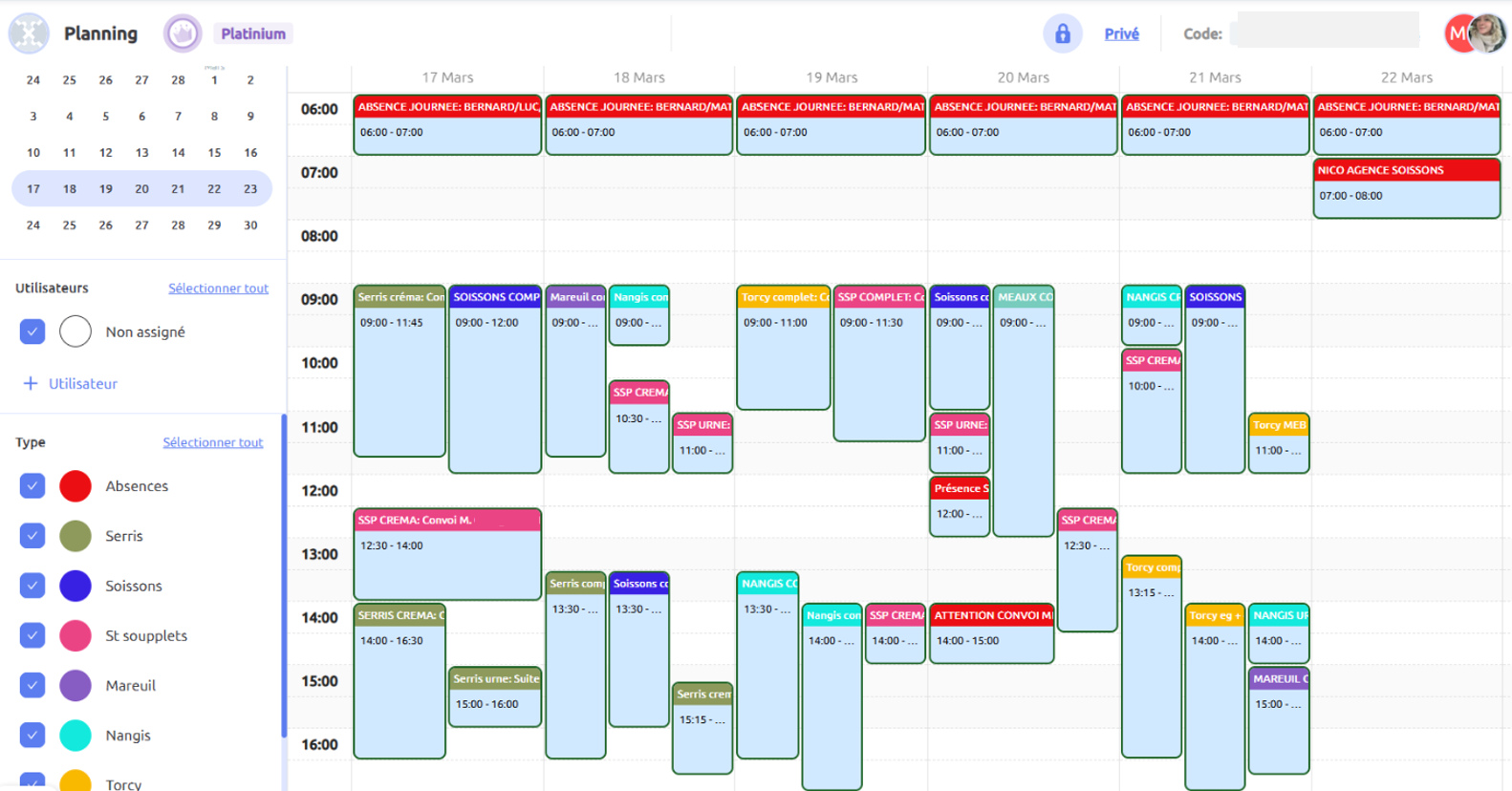
Joynit shows your team’s week the way you think about it: a row for each person, with their assignments, time off, and where they are. By day, week, or month. Everyone sees the same calendar, from the office or their phone.

👀 Who’s working today: in, remote, traveling, off, on duty. Color-coded, readable in two seconds.
📋 Who’s on what: assign a task, a shift, or a client to one or several people, and see who’s free before you pick.

🎨 Your categories, your colors: by task type, customer, project, or status. Filter by person or by category.

‍

👉 Fewer “who’s in tomorrow?” messages, and a team that always knows the plan.

Team calendar planning tool in Joynit: who’s in, who’s out and who’s assigned to what, week by week
Online calendar app Joynit on mobile: instant notification when the team calendar changes, synced with Google Calendar and Outlook

Make a change, and the whole team knows

No more “I never got the message”

Move an assignment, swap a shift, add a day off: the people involved get a notification on their phone, and the calendar updates for everyone at once.

🔔 Instant notifications: every assignment and every change reaches the right person, no group text needed.
📱 Everyone has their own view: each team member sees their calendar on the iOS or Android app, and only what concerns them.
🔄 Syncs with what they already use: Google Calendar, Outlook, Apple Calendar.

‍

👉 One source of truth, and no one left guessing.

‍

Time off and availability, built into the calendar

See absences before they become a problem, not after

Vacation, sick days, appointments: team members request time off right in Joynit. You approve it (or let it auto-approve), and it shows up on the shared calendar for everyone.

🌴 Time off on the same calendar: no separate tracker, no surprises when you assign work.
⚠️ Conflicts flagged automatically: try to assign someone who’s off, and Joynit tells you.
✅ Requests in one place: pending, approved, declined, all visible to you and to them.

‍

‍👉 You plan faster, with fewer mistakes, and nobody gets scheduled on their day off.‍

Time off and availability on the shared team calendar in Joynit: vacation requests approved and conflicts flagged
Assignment details in the Joynit shared calendar: notes, files, address with directions, and team chat

Everything about an assignment, in one place

Notes, files, address, and the conversation, attached to the calendar

An assignment in Joynit isn’t just a time slot. It holds everything the person needs, so nobody has to ask.

📄 Notes, documents, and photos
📍 Address, with directions in Google Maps or Waze
💬 A comment thread for that assignment, instead of a group text
🧠 A summary written automatically when it’s done
👤 Customer or contact details and history

‍

👉 Fewer tools, fewer “where’s the info?” messages, and nothing falls through the cracks.

Questions about Joynit’s shared team calendar

❓ Is Joynit a shared calendar or a scheduling app?
It’s a shared calendar built for small teams, with a calendar planning tool for whoever runs it: assign people, see who’s available, manage time off. It’s not a time clock or a payroll system, and it doesn’t replace your HR software. It just shows who’s in, who’s out, and who’s on what.

❓ How much does Joynit cost for a small business?
One flat price for the whole team, based on team size: from $47/month for 4 people, with no annual contract. Most tools charge per user; Joynit doesn’t. Start with a 15-day free trial, no credit card required.

See pricing.

❓ How long does it take to set up?
A few minutes. Create your calendar, invite your team by email, and start assigning. No training needed, and real people answer if you have a question.

❓ Can my team see the calendar on their phone?
Yes. Everyone gets the iOS or Android app, sees their own calendar, and gets a notification when something changes. It also syncs with Google Calendar, Outlook, and Apple Calendar.

❓ Can employees request time off in Joynit?
Yes. They request it in the app, you approve it or set it to auto-approve, and it appears on the shared calendar for everyone. If you try to assign someone who’s off, Joynit flags it.

❓ Does everyone need a company email address?
No. Joynit works with any email: Gmail, Outlook, or your own domain. Add your team in a few clicks.

❓ Is Joynit a good fit for a team of 3 to 20 people?
That’s exactly who it’s built for: offices, agencies, clinics, shops, and service businesses that need everyone to know the plan. If you run a team of 50 with hourly shifts and payroll, a workforce management tool will serve you better.


Application mobile du logiciel de planning Joynit, agenda du jour sur iPhone

Discover client success stories

How EQUANS manages 5,000 maintenance appointments a year with Joynit

We’ve eliminated hundreds of phone calls and given our teams their time back.
Read the testimonial

How to Choose the Best Scheduling Software for Small Businesses

Joynit offers a comparison of the best scheduling solutions, tailored to the needs of small businesses

View Comparison

An Alternative to Google Calendar and Excel for Scheduling Work

When teams rely on Google Calendar or Excel, they often end up compromising between simplicity and flexibility. Here’s a clear comparison of the three most common scheduling tools.

Read the case

Still not sure? Let's talk.
20 minutes to see Joynit with your own team setup, and get your calendar ready. Free trial, no credit card.

No credit card · 7,000+ organizations · 4.8/5 on Google