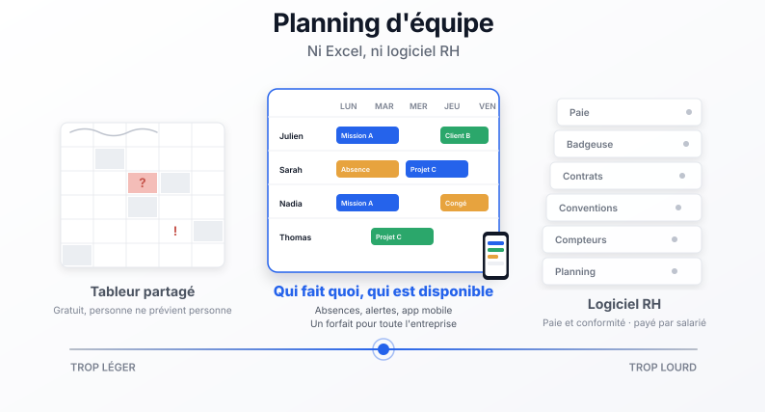
A team schedule answers three questions: who is doing what, who is available, who is off. To answer them, a small service business is usually offered either a spreadsheet or a full employee scheduling and HR platform. Joynit is team scheduling and availability planning software for teams of 3 to 50: simple, available on web and mobile app, with no payroll or time clock, priced as one flat rate for the whole company.
Team scheduling software is a shared calendar that shows, for each team member, their tasks, assignments, appointments and time off on a single grid. Availability planning is the same grid read the other way: it shows who is free, and when, to take on new work.
It applies to small service businesses where the work depends on who is available: agencies, consulting firms, professional practices, cleaning companies, property management and concierge services, training and care providers, nonprofits with staff, local organizations.
Team scheduling software is not a workforce management or HR tool: it organizes the work, it does not run payroll.
One tab per week, one row per person, colored cells: the spreadsheet works while the team is small and desk-based. It stops working when:
The spreadsheet records, but it doesn't warn anyone and doesn't show availability.
Employee scheduling platforms such as When I Work, Deputy or Homebase are built for shift-based teams (restaurants, retail, healthcare, hospitality): shift templates, time clock, labor law compliance, overtime tracking, payroll export. They are priced per user per month, typically from $2.50 to $6 per user for scheduling alone, with time clock, payroll and HR modules as paid add-ons, or per location.
These tools suit businesses that run shifts and need accurate payroll. For a team of ten consultants, eight cleaners or a five-person property management office, they mean configuring rules you will never apply and paying for every employee, every month.
Joynit is team scheduling software. It is not an HR tool. It is a shared schedule with the few functions that make a team schedule useful:
Joynit does not run payroll, manage contracts, track clock-ins or check labor law compliance. If those are your primary need, an employee scheduling or HR platform like Deputy or When I Work is the right tool. Joynit stops at organization: who does what, when, and who is available.
Joynit charges one flat rate per company, not a price per employee. Every feature is included. Prices per month, cancel anytime, 15-day free trial with no credit card (see official pricing).
An intern, a part-timer or a seasonal hire is added without changing the bill, as long as you stay within the plan.
Joynit fits teams of 3 to 50 people with no HR department who want a team schedule and availability view everyone can read: agencies, consulting firms, professional practices, service companies, cleaning companies, property managers and concierge services, training and care providers, nonprofits, local organizations. It fits teams for whom the schedule is a coordination tool, not an administrative record.
Is Joynit HR or workforce management software?
No. Joynit is team scheduling and availability planning software. It manages tasks, assignments and time off, but not payroll, contracts or clock-ins.
Does Joynit replace When I Work or Deputy?
For a small service team that wants to see who is doing what and who is available, yes. For a business that runs shifts, tracks overtime for compliance and needs payroll export, no.
How do I see team availability in Joynit?
On the per-person view, each row shows tasks and time off; empty slots are availability. Joynit warns you if a task is assigned to someone who is off.
Can employees request time off in Joynit?
Yes, from the mobile app or the web. The request can be approved by a manager or recorded directly, depending on your setting.
How much does Joynit cost for a team of 10?
$109 per month on the Medium plan (up to 12 users), every feature included.
Try Joynit free for 15 days, no credit card required: add your team, enter this month's time off and schedule a week. Discover Joynit team scheduling.
Scheduling field jobs at customer sites instead? Read our article on field service scheduling software.