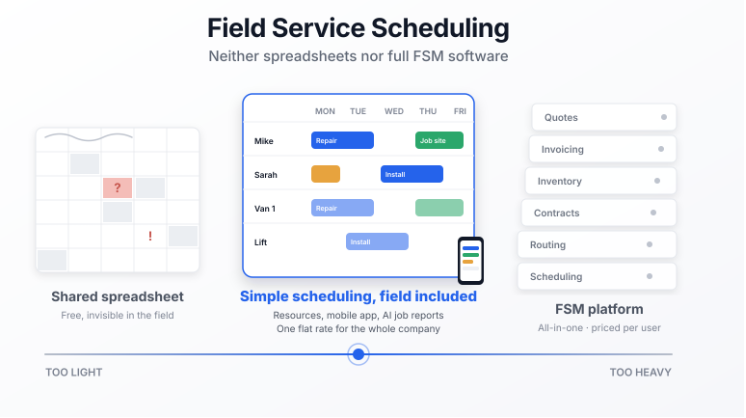
Field service scheduling software lets a small service business see who is working where, when, with which vehicle and which equipment. Until now, small teams had two choices: a spreadsheet that breaks as the team grows, or a full field service management (FSM) platform that does everything, including what you don't need. Joynit is field service scheduling software built for teams of 2 to 50: simple, available on web and mobile app, and priced as one flat rate for the whole company.
Field service scheduling software is a shared calendar where every job links a customer, an address, a date, one or more technicians and, often, a physical resource such as a van, a machine or a piece of equipment. It is used to schedule, assign, move and track jobs, and to get the information to the people in the field.
It applies to every trade that sends people to customer sites: plumbing, electrical, HVAC, maintenance, repair, cleaning, property management and concierge services, landscaping, installation, inspection.
Field service scheduling software is not a shared personal calendar: it starts from the job, not from the person.
Most small businesses start with a spreadsheet, a whiteboard or a group text. It's free and everyone knows how to use it. The limits show up as soon as three or four people are on the road:
Field service management software covers the whole chain: scheduling, dispatching, job tracking, reports, but also quotes, invoicing, payments, inventory, contracts and route optimization. In the US, Jobber and Housecall Pro are the best-known names in this category, with ServiceTitan at the enterprise end.
These platforms suit structured companies that want to run their entire business from one system. For a small team, they come with three drawbacks: a long setup, training for every employee, and per-user or per-tier pricing (Jobber starts around $49 per month, Housecall Pro at $59 per month for a single user, and both move to roughly $150 per month for a team of five). Every technician, apprentice and seasonal hire adds to the bill.
Joynit is field service scheduling software that started from the schedule, not from the invoice. Its core is a job grid by day, week or month, by technician or by resource, edited by drag and drop. Around that core, Joynit adds the functions that matter in the field:
Joynit does not do quotes, invoicing, payments or inventory. Those belong to an FSM platform or an accounting tool. If you need to invoice directly from the schedule, a full field service management platform like Jobber or Housecall Pro is the right choice.
Joynit charges one flat rate per company, whatever the number of jobs. Every feature is included in every plan. Prices per month, cancel anytime, 15-day free trial with no credit card (see official pricing).
For a team of 5, Joynit costs $69 per month on the Small plan, compared with roughly $150 per month for an FSM platform at the same team size.
Joynit fits companies of 2 to 50 people that send teams to customer sites: plumbers, electricians, HVAC contractors, maintenance and repair companies, cleaning companies, property managers and concierge services, landscapers, installers. It fits businesses that want to replace the spreadsheet with a tool their team learns in an afternoon, without adopting a full FSM platform.
Is Joynit field service management software?
Joynit is field service scheduling software. It covers scheduling, resources, job reports, photos, documents, chat and customer records, but not quotes or invoicing.
Does Joynit replace Jobber or Housecall Pro?
For a small business that needs simple field scheduling, yes. For a company that wants to quote, invoice, take payments or optimize routes from the same tool, no.
Does Joynit have a mobile app?
Yes, on iOS and Android. Technicians check their schedule, the address, notes and documents, and write their job report from the phone.
How much does Joynit cost for a team of 5?
$69 per month on the Small plan (up to 8 users). The Mini plan at $47 covers up to 4 users.
Do customers need an account to see a job?
No. A customer or subcontractor can view a shared time slot from a link, with no sign-up.
Try Joynit free for 15 days, no credit card required: set up your resources, schedule a typical day and see whether the grid works for your team. Discover Joynit team scheduling.
Managing an office team and its time off instead? Read our article on team scheduling and availability planning.