Whether you're running a soccer team, a book club, a parent group, or a neighborhood association, one challenge always comes up: keeping everyone on the same page. Between scheduling events, tracking who's coming, and making sure no one misses an update, coordination can quickly turn into a full-time job.
That's why choosing the right shared calendar for small groups matters more than most people think.
In this guide, we'll help you identify what to look for — and compare the most popular tools used by small groups and community organizations in the United States.
Most groups start with what's already available: a WhatsApp group, a Facebook event, an email chain, or a shared Google spreadsheet. These tools work — until they don't.
The real problems start when:
Sound familiar? You're not alone. This is the default experience for most clubs, volunteer groups, hobby communities, and local organizations. And it's exactly the problem a shared group calendar is designed to solve.
A shared calendar isn't just for businesses or large nonprofits. It's equally valuable for:
What all these groups have in common: they need coordination without complexity. Most members are not technical users. Most organizers are volunteers themselves. The tool needs to just work — for everyone.
Before picking a tool, it helps to be clear about what your group actually needs. Here are the most important criteria for small groups and community organizations:
The #1 reason shared calendars fail in small groups: people don't show up. If joining requires creating an account, downloading an app, or navigating a complex setup — most members won't bother. Look for tools that let members access the calendar via a simple link, with no account required.
Most members will check the schedule on their phone, not a desktop. Mobile experience isn't optional — it's essential. Push notifications for upcoming events make a significant difference in attendance and engagement.
Organizers should be able to create an event in under two minutes. If it takes longer than that, it won't get done consistently. Look for tools with clear forms, recurring event options, and easy RSVP tracking.
Knowing who's coming matters — whether you're ordering pizza for the team or managing volunteer shifts. A good group calendar makes it easy for members to confirm attendance and for organizers to see who's in at a glance.
Most groups operate on a recurring schedule: weekly practice, monthly meeting, annual fundraiser. The calendar should handle recurring events natively, without having to recreate them each time.
Not every event needs to be visible to everyone. Some groups manage a mix of public events (open to the community) and private events (members only). The ability to control visibility per event is important for organizations of any size.
Organizers should be able to share the calendar via a link or embed it on a website — so members and the public can always find the latest schedule without asking.
Most small groups operate with no budget or a very small one. The right tool offers a free plan for small teams and affordable pricing as the group grows — without enterprise-level complexity or cost.
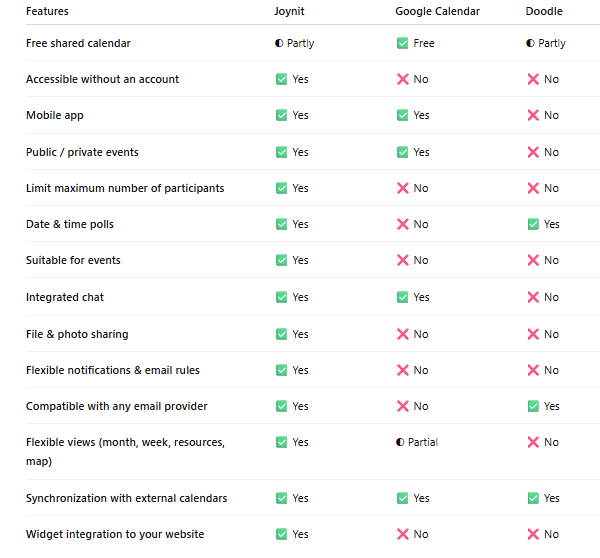
Google Calendar is the go-to default — and for individual use, it's excellent. But for small groups, it runs into real limitations quickly.
The biggest friction point: every member needs a Gmail account. For a family group, a neighborhood association, or a volunteer organization with members of all ages and technical comfort levels, this requirement alone causes significant drop-off during onboarding.
Beyond access, Google Calendar wasn't designed for group coordination. As the number of events and participants grows, managing shared calendars becomes increasingly complex. Permissions are confusing, views get cluttered, and there's no native RSVP or attendance tracking built for community use.
For small informal groups, Google Calendar works best as a personal tool — not a coordination hub.
Facebook Events solves the visibility problem — most people already have an account — but it creates new ones. Not everyone uses Facebook, and younger or older demographics are increasingly absent from the platform. Events get buried in the news feed. There's no persistent calendar view. And the tool is designed for public promotion, not internal group coordination.
For groups that need a reliable, ongoing shared schedule — not just one-off event announcements — Facebook Events is a starting point, not a solution.
The best shared calendar for a small group isn't the one with the most features. It's the one that gets used — consistently, by everyone.
That means:
The shift from WhatsApp chaos to a shared calendar isn't just about organization. It's about reducing the mental load on the one person managing everything — and making participation easier for everyone else.
Setting up a shared group calendar doesn't have to be complicated. Here's a simple process:
Most groups see a noticeable improvement in attendance and communication within the first few weeks of switching to a dedicated shared calendar.
If your group is still coordinating by WhatsApp, email, or Facebook — you're spending more time on logistics than you need to. A shared calendar designed for small groups replaces the chaos with one place everyone can rely on.
Whether you're managing a sports team, a faith community, a neighborhood association, or a volunteer group, the right tool is the one that's simple enough for every member to use — and powerful enough for every organizer to trust.
👉 Try Joynit free — the shared calendar built for groups
Related articles: