Best Shared Calendar for Nonprofit Organizations (Comparison Guide)
How to Choose the Best Shared Calendar for a Nonprofit Organization
Managing time and events is a constant challenge for nonprofit organizations. Between board meetings, community events, volunteer shifts, room bookings, and recurring activities, coordination can quickly become overwhelming. That’s why choosing the right shared calendar for nonprofit organizations is critical.
A good shared calendar helps nonprofits centralize planning, keep everyone aligned, and avoid confusion. In this comparison guide, we’ll explain how to choose the best solution for your nonprofit’s needs—and compare the most popular shared calendar tools used in the United States.
Why Nonprofits Need a Shared Calendar
A shared calendar for nonprofit organizations brings all essential information into one place: upcoming events, volunteer schedules, internal meetings, room availability, and more. Instead of juggling emails, spreadsheets, and multiple tools, teams can rely on a single source of truth.
Key benefits include:
✅ Better coordination between staff and volunteers
✅ Easier volunteer scheduling and availability tracking
✅ Time savings for organizers and coordinators
✅ Fewer scheduling conflicts and missed events
✅ Real-time updates accessible from anywhere
For many nonprofits, switching to a shared calendar also means higher volunteer engagement and smoother day-to-day operations.
Criteria for Choosing the Right Shared Calendar for Nonprofits
Before selecting a tool, it’s important to clearly define your organization’s needs. Not all shared calendars are designed with nonprofits in mind.
Key questions to ask:
Number of users: Will staff, volunteers, and external contributors need access?
Types of activities: Meetings, public events, room bookings, or volunteer shifts?
Volunteer scheduling: Can volunteers easily view schedules and confirm participation?
Customization: Are event types, colors, and notifications flexible?
Mobile access: Is smartphone access essential for volunteers in the field?
Budget: Do you need a free solution, or are you open to nonprofit-friendly pricing?
Answering these questions will make it much easier to identify the best shared calendar for nonprofit use cases—and to compare tools objectively.
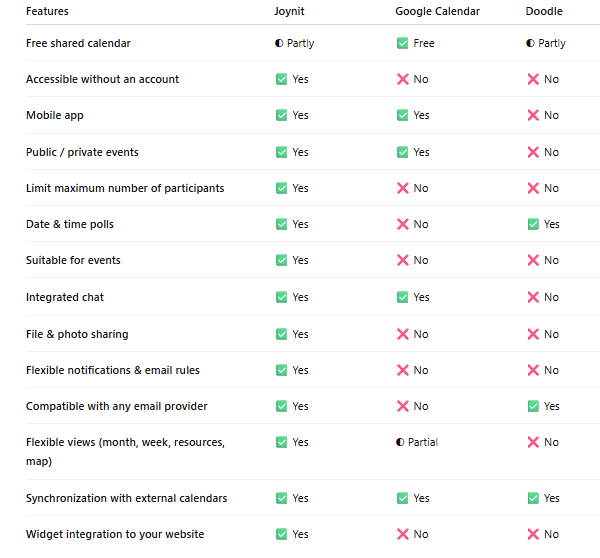
Below, we compare the most popular shared calendar tools using 14 practical, nonprofit-focused criteria to help you choose the best solution for your organization.
Shared calendar for nonprofit - 14 criteria to help your choose
For nonprofits managing events, volunteers, and shared resources, flexible views (monthly, weekly, resource-based) make a significant difference when choosing a shared calendar for nonprofit organizations.
Free or Premium Solutions for Every Nonprofit Budget
Because most nonprofit organizations operate with limited resources, choosing a shared calendar often starts with one key question: is it free, and is it easy to use at scale? While free tools can work for small teams, they quickly reach their limits as coordination needs grow.
For example, Google Calendar is technically free, but only if every participant has a Gmail account. In practice, this creates significant friction for nonprofits and volunteer-based organizations. Requiring all members and volunteers to create (and manage) Gmail accounts can slow adoption and exclude occasional or external contributors.
Even when everyone has access, managing a shared calendar with more than a handful of people often becomes chaotic. As the number of events, calendars, and participants grows, views become cluttered, permissions harder to manage, and overall organization increasingly complex—especially beyond ten active users.
By contrast, Joynit was designed from the start as a shared calendar for nonprofit communities of all sizes, from small teams of 5 people to large organizations coordinating hundreds or even thousands of volunteers. Calendars can be shared via a simple link, without requiring users to create an account, making onboarding fast and frictionless.
Mobile App and Member Engagement
Today, a mobile experience is no longer optional. While organizers often create and manage events from a desktop computer, most members and volunteers interact with the calendar on their smartphones.
A mobile app plays a critical role in volunteer scheduling, real-time updates, and day-to-day engagement. Push notifications, RSVP options, and instant access to event details help ensure that volunteers stay informed and involved.
Shared calendars that combine mobile access with features like attendance tracking, notifications, and integrated chat significantly improve participation and coordination—especially for nonprofits managing recurring events, shifting volunteer availability, or last-minute changes.
Privacy, Access Rights, and Event Management
Not every event needs to be visible to everyone. A well-designed shared calendar for nonprofit organizations should make it easy to manage access rights while keeping information secure and well organized.
Nonprofits often juggle public events, internal meetings, volunteer shifts, and restricted activities. The ability to control visibility event by event is essential. With the right calendar, organizers can decide which events are public, private, or limited to specific groups—without complex setup or technical barriers.
Effective event management also goes beyond simple scheduling. Nonprofits should be able to:
Limit the maximum number of participants for each activity to prevent overbooking
Split events into time slots (such as workshops, volunteer shifts, or visits) so participants can choose what works best for them
Add external ticketing or registration links (for example, Eventbrite) directly within the event details
Clear role management is equally important. A good nonprofit calendar distinguishes between organizers and participants, allowing coordinators to manage events while keeping the experience simple for volunteers.
For accessibility and adoption, sharing the calendar should be effortless. Being able to send a calendar link via email or messaging apps like WhatsApp, without forcing account creation, removes friction—especially for volunteers and external contributors.
Finally, nonprofits benefit from being able to embed their calendar directly on their website using a calendar plugin or widget. This makes events visible to the community, supports volunteer scheduling, and keeps information up to date in one central place.
Ergonomics: Don’t Overlook Usability
Ease of use is one of the most important—yet often underestimated—criteria when choosing a shared calendar. Tools like Google Calendar work well for individual use or office environments, but they are not designed for large-scale nonprofit collaboration. When managing multiple events, volunteers, and activities, these tools can quickly become cluttered and inefficient.
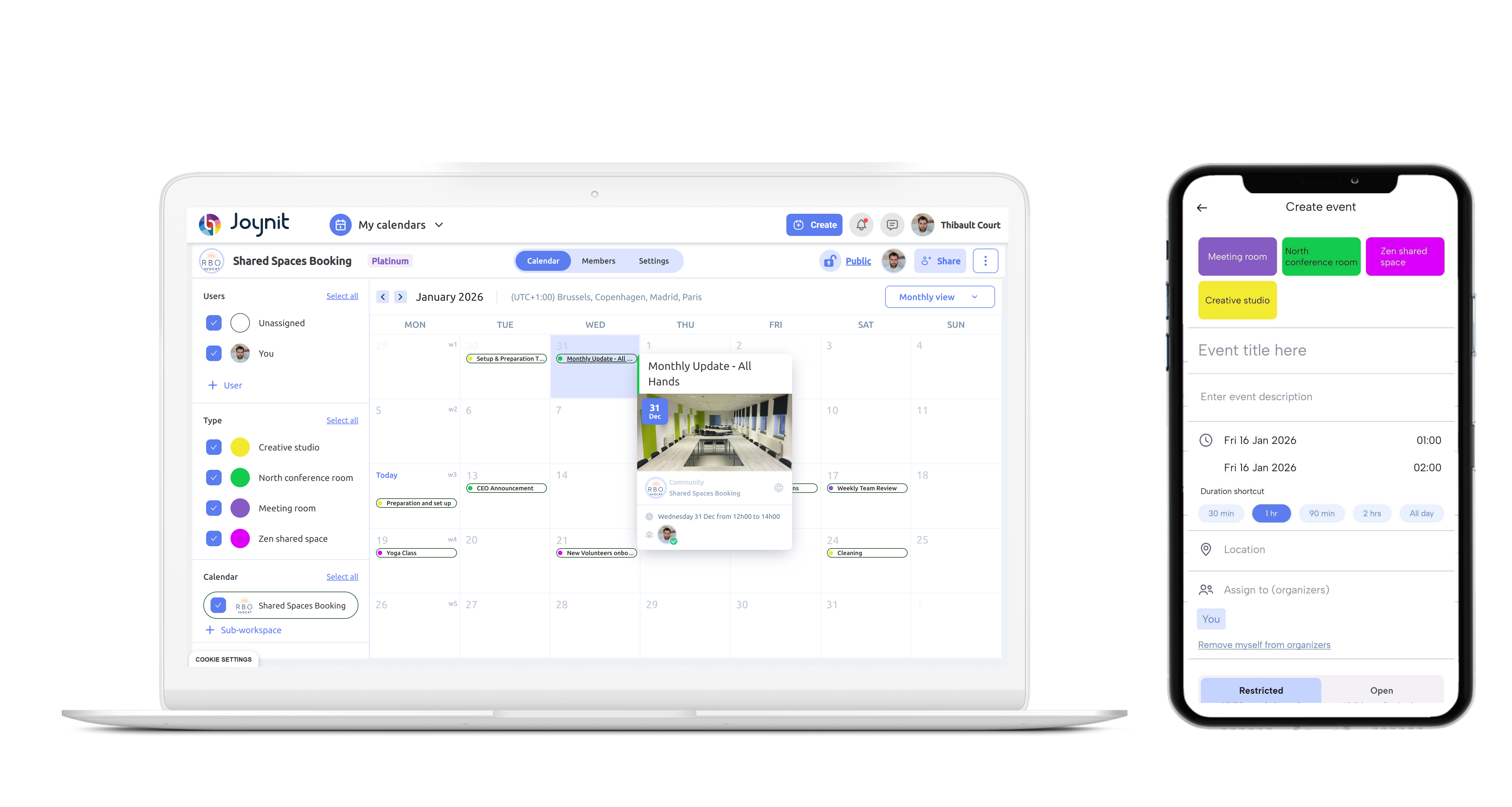
A shared calendar for nonprofit organizations should make events easy to understand and appealing at first glance. Dedicated platforms like Joynit allow nonprofits to create events with clear descriptions, cover images, and structured details, making it easy for members to see what’s coming up and decide where to participate. Volunteers can quickly browse upcoming events in an interactive calendar, without digging through emails or long invitation lists.
An interactive calendar designed for community use is far more likely to be adopted quickly. Joynit was built specifically for nonprofits and volunteer groups, focusing on clarity, accessibility, and engagement—especially on mobile, where most members check schedules and updates.
By contrast, office-oriented tools centered on emails, meeting invitations, and business workflows—such as Google Calendar—are often harder to introduce smoothly within nonprofits. For less tech-savvy audiences, these tools can feel complex and unintuitive, slowing adoption and reducing engagement.
For nonprofits, choosing a calendar that prioritizes usability and visual clarity is essential for successful volunteer scheduling and long-term coordination.
Throughout this comparison, one pattern stands out: nonprofits benefit most from tools built specifically for event coordination and volunteer engagement.
An interactive community event calendar allows organizations to present events clearly, manage attendance, and keep volunteers informed—all in one place.