Best Shared Calendar App in 2026: How to Choose the Right One
Thibault Court
March 5, 2026
A shared calendar app has become essential for any group that needs to stay organized — whether you're running a nonprofit, coordinating a team, managing a club, or planning family events. But not all tools are built the same way. Some are personal calendars bolted with a "share" button. Others are designed from the ground up for collective use.
Here's everything you need to know to choose the right shared calendar app in 2026.
Shared calendar app vs. sharing your personal calendar
This distinction matters more than most people realize.
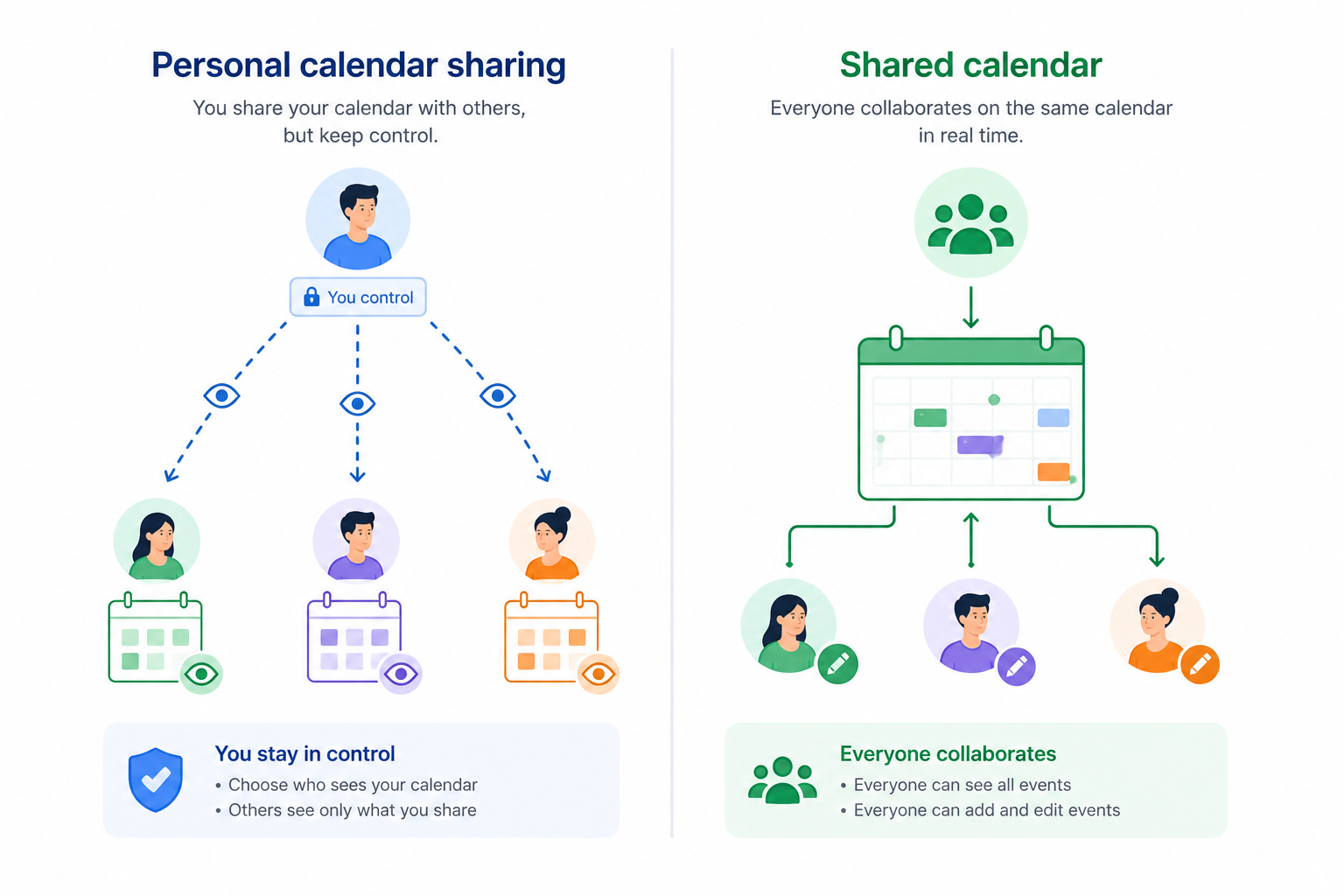
Apps like Google Calendar or Outlook are built around one user. Sharing is an afterthought — you can give others visibility into your calendar, but the tool still belongs to you. There's one owner, limited role management, and the whole system breaks down the moment that person leaves or changes account.
A true shared calendar app works differently. The calendar belongs to the group, not to an individual. Events, time slots, and resources are created as shared objects, visible and manageable by everyone with the right permissions. This is what makes collective scheduling actually work at scale, without relying on one person to "own" everything.
If you've ever chased someone for calendar access, or lost track of a schedule because the person who managed it left the team, you know exactly why this matters.
Shared Calendar App - How it works
Key use cases for a shared calendar app in 2026
A shared calendar app isn't a niche tool. It covers a surprisingly wide range of everyday organizational needs:
Teams & small businesses — schedule meetings, manage shifts, coordinate field operations, book shared resources like meeting rooms or equipment.
Nonprofits, clubs & associations — centralize event dates, manage volunteer schedules, keep members informed without relying on email threads.
Families & private groups — share a household schedule, coordinate activities, keep everyone on the same page without group chats.
Event planning — give multiple contributors access to a single event calendar, reduce back-and-forth, and make updates visible to everyone instantly.
In each of these cases, the core need is the same: one shared view, updated in real time, accessible to everyone involved.
Mobile app or desktop, do you really need both?
Short answer: yes.
The use pattern for a shared calendar app typically splits into two modes:
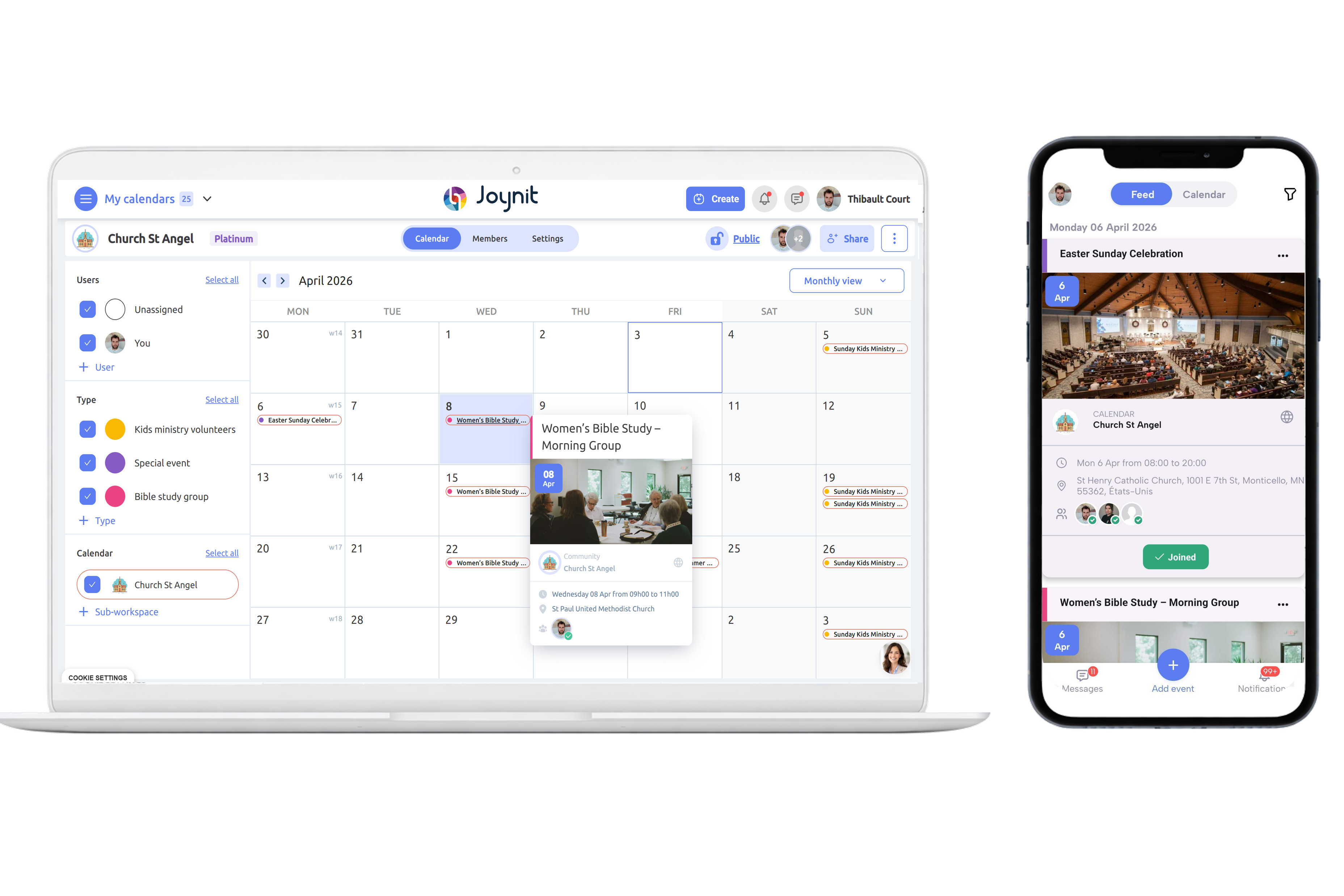
On mobile, people check the calendar quickly, get notifications about upcoming events, and confirm their availability on the go.
On desktop (web), admins and organizers do the heavier lifting — creating events, managing permissions, planning ahead with a broader view of the schedule.
An app that only works well on mobile will frustrate anyone trying to manage the calendar seriously. And an app that's desktop-only will get ignored by half the group. The best shared calendar apps in 2026 offer a seamless experience on both, same data, same real-time sync, different interface.
Shared Calendar App on mobile and Desktop
What to look for in a shared calendar app
Before committing to any tool, check these five criteria:
1. Works with any email address
Some tools only work within a specific ecosystem — Google Workspace, Microsoft 365, Apple. If your group has a mix of Gmail, Outlook, and personal email addresses, this is a dealbreaker. A good shared calendar app should work with any email, full stop.
2. Accessible on mobile and web
As discussed above — both matter. Check that the mobile app is actually usable, not just a stripped-down version of the web interface.
3. Viewable via a simple link
Members shouldn't have to create an account just to consult the calendar. A shareable link that lets anyone view upcoming events (without editing rights) removes a huge friction point for groups with occasional or external participants.
4. Syncs with existing calendar systems
Most people already use Google Calendar, Outlook, or Apple Calendar for their personal schedule. A good shared calendar app lets you sync so that group events appear in the calendar app you already use daily.
5. Clear role and permission management
You need at least three levels: admin (full control), editor (can add/edit events), and viewer (read-only). Without this, either everything is locked down or anyone can accidentally delete something important.
Joynit vs. other shared calendar apps in 2026
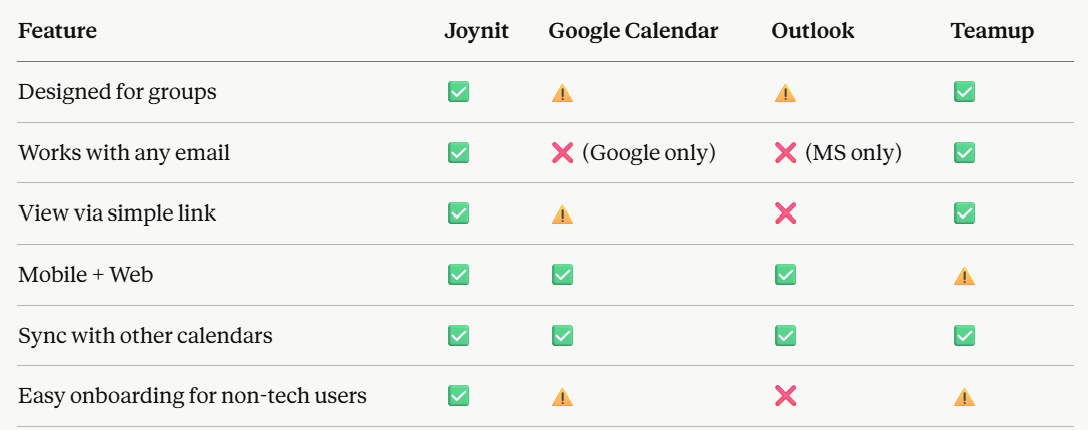
Here's an honest comparison of the main options on the market:
Shared Calendar App Comparison 2026 - Google Calendar Alternative
Where Joynit stands out
Built for groups from day one - not a personal tool adapted for sharing
Any email address works - no Google or Microsoft account required, which is critical for associations, nonprofits, and mixed groups
Instant access via link - anyone can consult the calendar without creating an account
Full sync with Google Calendar, Outlook, and Apple Calendar - events appear wherever your members already live
Fast onboarding - groups are up and running in minutes, no IT support needed
Honest limitations
Less name recognition than Google or Microsoft — some members may need a quick explainer
Fewer third-party integrations than enterprise tools like Microsoft 365
Best suited for small to mid-sized groups; very large organizations with complex workflows may need more customization
FAQ - Shared Calendar App
What's the difference between a shared calendar app and Google Calendar?
Google Calendar is designed for individual users and shared after the fact. A dedicated shared calendar app is designed from the start for collective use, with group-level ownership, role management, and features built around coordination rather than personal scheduling.
Can members view the calendar without creating an account?
With Joynit, yes, a simple shareable link gives read-only access with no sign-up required. This is particularly useful for public events or groups with external participants.
Does it work on iPhone and Android?
Yes. Joynit has native apps for both iOS and Android, alongside the full web version.
Can I sync with my existing calendar?
Yes. Joynit supports sync with Google Calendar, Outlook, and Apple Calendar, so group events appear directly in the calendar app your members already use.
Is a shared calendar app free?
Joynit offers a free plan for up to 8 users, with paid plans for larger groups. A free trial is available on all plans — no credit card required.
Ready to try a shared calendar app built for groups?
If your group is still coordinating through email threads, spreadsheets, or a personal Google Calendar with too many owners, it's worth trying something designed specifically for collective scheduling.
No credit card required. Free trial on all plans, free version available up to 8 users.