Shared Calendar for Events – Use Case Paris 2024 Olympics Games
Thibault Court
Event Calendar for a large Communityt: How a Shared Calendar simplifies coordination
A Shared Event Calendar Designed for Large-Scale Press and Public Events
Joynit was selected by the City of Paris to power a shared event calendar dedicated to French and international journalists covering a major global event. Over a two-week period, the calendar brought together more than 400 events for over 2,000 journalists, all needing clear, reliable, and real-time access to information.
This use case illustrates a common challenge for large organizations and public institutions: how to centralize complex event information and make it easily accessible to a diverse audience, without friction.
The goals for this event calendar were clear:
Display all upcoming events in a single, centralized view
Be accessible on both web and mobile devices
Allow direct integration into an official website
Support multiple languages (French and English)
Remain extremely easy to use, without forcing users to create an account
For an international audience with tight schedules and varying levels of technical comfort, simplicity and accessibility were essential.
Structuring Events with a Shared Calendar and Smart Filtering
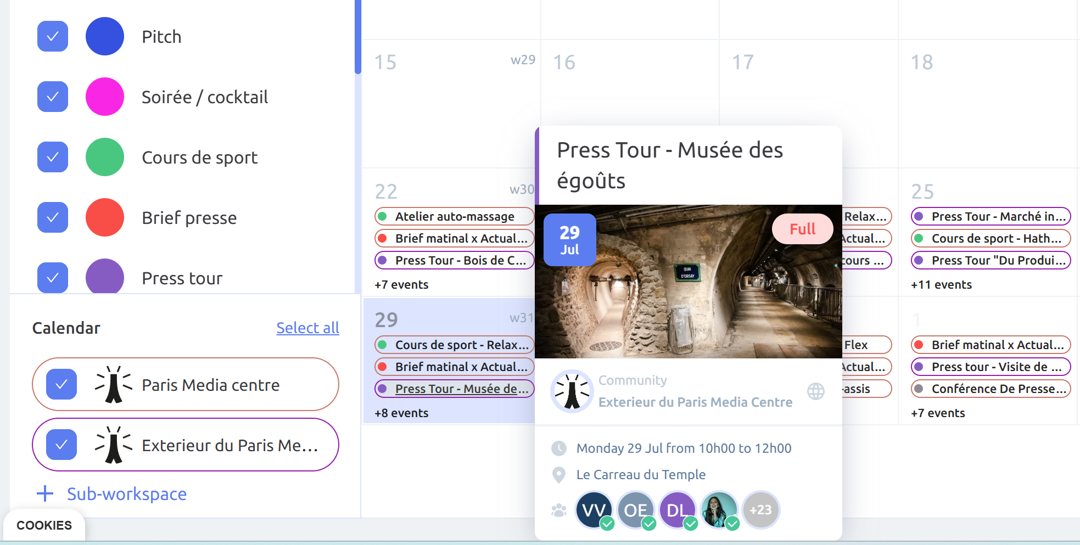
To meet these requirements, the shared calendar was structured using multiple event types and clear visual markers. Each event type was assigned a distinct color, allowing journalists and administrative teams to instantly understand what kind of event was coming up and filter the calendar accordingly.
The event calendar also relied on sub-calendars to separate events taking place inside the main media center from those happening at external locations. This structure made it possible for users to:
View all events at once
Focus only on internal events
Or display only external activities
By combining a shared calendar, sub-calendars, and simple filtering options, users could quickly find the information they needed—without navigating complex menus or switching between tools.
Shared Calendar monthly view + mobile app to create event
Managing Event Access and Visibility in a Shared Event Calendar
A key requirement for any large-scale event calendar is the ability to control who can see what. Not all events are meant for everyone, and a well-designed shared calendar must support different levels of visibility without adding complexity.
In this use case, the event calendar supported both public events, visible to all users, and restricted events, accessible only to administrators or selected participants. This made it easy to manage invitation-only or VIP events while keeping the rest of the calendar fully open and transparent.
Each event opened into an interactive event page designed for clarity and quick understanding. Users could instantly see essential information such as the date, time, venue, address, and a cover image that helped identify the event at a glance. Additional materials—such as documents or photos—could also be attached directly to the event, ensuring that all relevant information was available in one place.
This combination of flexible access control and rich event details allowed the shared event calendar to serve both open audiences and restricted groups, without duplicating tools or creating confusion.
Event page with RSVP
Managing Event Capacity and Real-Time Attendance
Controlling attendance is essential when managing events of any size. A reliable event calendar must make it easy to limit the number of registrants per event and clearly indicate when an event is fully booked.
With Joynit’s shared event calendar, organizers can define a maximum number of participants for each event directly in the event settings. Once the capacity is reached, the event is automatically marked as full, preventing additional registrations and avoiding on-site confusion.
Organizers can also see exactly who has registered for each event in real time. This visibility makes it easier to anticipate attendance, adjust staffing or logistics, and ensure that the right people are informed.
Another key advantage is real-time notifications. When a participant cancels or removes their registration, administrators are notified immediately. This allows organizers to react quickly—freeing up spots, updating internal plans, or inviting other participants if needed.
By combining capacity limits, clear attendee lists, and real-time updates, the shared calendar ensures smooth event management and gives organizers full c
Manage RSVP of your events in the shared calendar
No Account Required: Frictionless Participation in a Shared Event Calendar
One of the biggest barriers to event participation is forced account creation. A well-designed event calendar should make it easy for users to register and participate—without unnecessary steps.
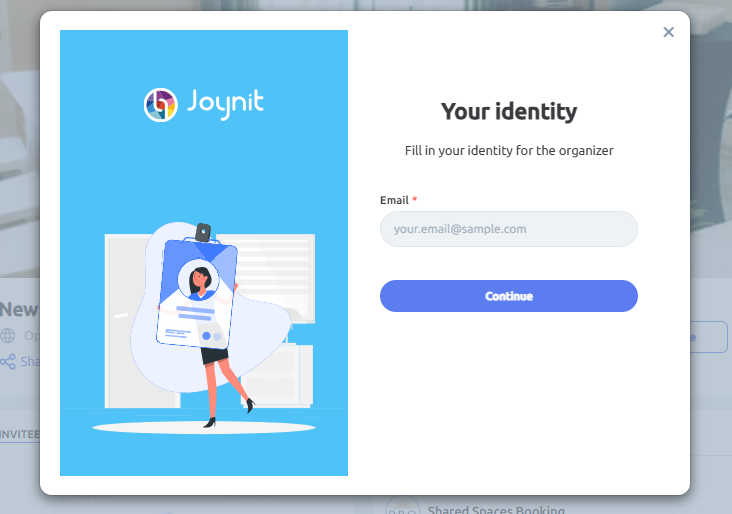
With Joynit’s shared event calendar, participants were able to register for events without creating an account. They simply entered their email address, first name, and last name to confirm attendance. This made participation fast and accessible, even for occasional or first-time users.
For those attending multiple events, Joynit also offered the option to create a secure personal account. Once logged in, participants could register for events with a single click, avoiding repeated data entry while keeping full control over their information.
Each registration automatically triggered a confirmation email sent to the participant. This email included an ICS calendar file, allowing the event to be added instantly to the participant’s default calendar (Google, Outlook, Apple Calendar, etc.).
By removing mandatory accounts while still offering optional convenience features, the shared calendar balanced accessibility and usability—making event participation smooth for both one-time attendees and regular users.
No account needed, just an email
Embedding an Event Calendar Directly on an Official Website
For large audiences, access to information should be immediate and centralized. A strong event calendar must be easy to integrate directly into an existing website, without forcing users to navigate to external tools.
In this case, the shared event calendar was embedded directly into the official media website using Joynit’s iframe embed. This allowed accredited users to view all upcoming events without leaving the site they already relied on.
The embedded calendar offered multiple display options to match different browsing needs:
A classic calendar view for planning ahead
A carousel view highlighting key events
An upcoming events feed for quick, at-a-glance updates
This flexibility made it easy for users to quickly check what was happening next, discover upcoming events, and stay informed—directly from the official website.
By embedding a shared event calendar into a public site, organizations can increase visibility, reduce friction, and ensure that event information is always up to date in one central place.
Event calendar plugin integrated into a website
As a result, journalists could see upcoming events at a glance directly from the city’s official website, without navigating between multiple tools or pages.
Weekly Planning View for Clear Event Organization
For organizers managing multiple activities, having a clear overview is essential. A well-designed event calendar should make it easy to plan and adjust schedules at a glance.
Using a weekly planning view, organizers were able to see all scheduled events in one consolidated timeline. This view provided immediate visibility into how the week was structured and helped teams anticipate overlaps or resource constraints.
The shared calendar also offered simple filtering options. Events could be filtered by event type using color codes, or by calendar and sub-calendar, making it easier to focus on specific activities or locations when preparing schedules.
By combining a weekly planner view with intuitive filters, the event calendar enabled more efficient organization and smoother day-to-day coordination—especially when managing a high volume of events.
Event planning
Using the Mobile App to View and Participate in Events
Mobile access is essential for modern event coordination. A reliable event calendar must be easy to use on the go, especially for participants and organizers who rely on their phones throughout the day.
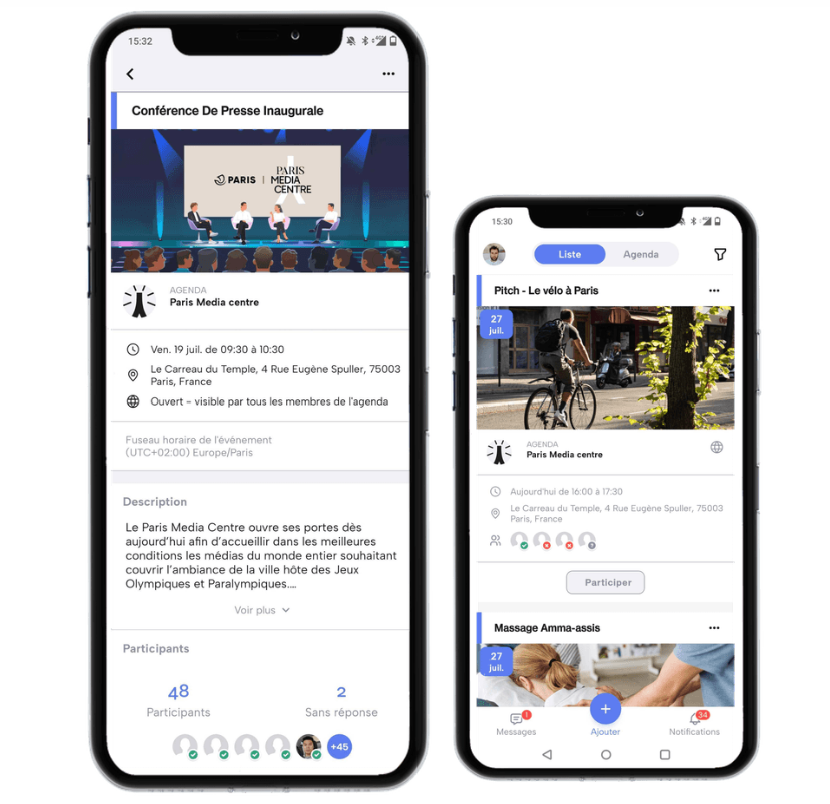
The Joynit mobile app is available for free on iOS and Android. Upon signing up, users could simply enter a shared calendar access code to instantly access the full event calendar—no complex setup or configuration required.
The mobile app provided several key advantages:
Intuitive user experience with simple and clear navigation
Reminders and push notifications to stay informed about upcoming events
One-click RSVP, making participation fast and effortless
By offering full access to the shared event calendar on mobile, Joynit ensured that users could view schedules, register for events, and receive updates anytime, anywhere—supporting real-time coordination and higher participation rates.
mobile app shared calendar
Conclusion: A Shared Event Calendar Built for Large-Scale Audiences
Joynit’s shared event calendar proved to be a reliable solution for managing a high volume of events for an international audience, with very different levels of technical familiarity. By prioritizing clarity, accessibility, and ease of use, the calendar made it simple for participants to discover events, register when needed, and stay informed—without friction.
Event organization and participation were handled seamlessly. Updates, key information, and highlighted events were presented in a clear and consistent way, helping users navigate a dense schedule with confidence.
This use case demonstrates how a well-designed event calendar can support complex event programs, serve diverse audiences, and remain easy to adopt—even at scale.